
Shopping carts get abandoned. A lot. Almost 70% of online shoppers end up leaving their carts behind without ever completing the checkout process. That’s a staggering amount of potential revenue walking away from your store.
Here’s the good news: cart abandonment emails are highly effective. They tend to get strong engagement and can bring back a notable portion of lost sales. In short, it’s revenue waiting to be recovered with a well-crafted email sequence.
Creating an automated cart abandonment email series isn’t complicated, but it does take some planning. Here’s a step-by-step look at how to build one that truly drives conversions.
Understanding Why People Abandon Carts
Before diving into the setup, it helps to understand why shoppers leave in the first place. Sometimes it’s unexpected shipping costs. Other times, they’re just browsing and not ready to commit. Maybe they got distracted by a phone call, or perhaps they wanted to compare prices elsewhere.
The reasons vary, but the solution remains the same: a well-crafted email sequence that brings them back and addresses their concerns.
The Perfect Timing for Your Email Sequence
Timing can make or break your cart abandonment strategy. Send emails too quickly, and the shopper might still be on your site. Wait too long, and they’ve already bought from a competitor or lost interest completely.
Email #1: The Gentle Reminder (1 hour after abandonment)
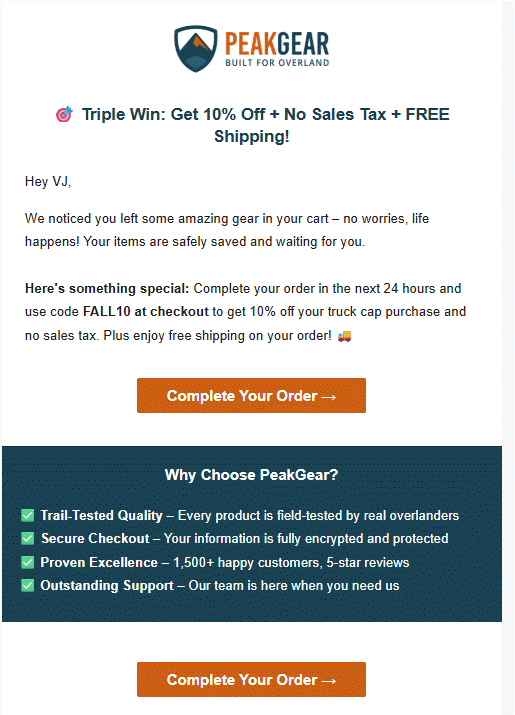
Source: PeakGear
The first email should go out within the first hour. This is a friendly nudge that serves as a genuine reminder. Many people abandon carts simply because they got distracted or their browser crashed. This email has the highest conversion rate of the entire sequence because the purchase intent is still fresh.
Remind them what they left behind, make it easy to return to their cart with a clear call-to-action button, and that’s it. No pressure, no aggressive sales tactics.
Email #2: The Problem Solver (24 hours after abandonment)
The second email should be sent about 24 hours later. If they still haven’t come back by now, chances are it’s not just because they forgot. This email should address common objections.
Include customer reviews or testimonials, highlight your return policy, showcase any security badges, or mention free shipping if you offer it. The goal here is to remove friction and build trust.
Email #3: The Final Offer (48-72 hours after abandonment)
The third email is your last chance. This is where many businesses introduce an incentive — a small discount, free shipping, or a limited-time bonus. Not every business needs to offer a discount here, but if you’re going to, this is the strategic moment.
Create urgency without being pushy. Let them know this is the final reminder, and consider mentioning that items in carts aren’t reserved forever (if that’s true for your store).
Crafting Email Content That Converts
The technical setup matters, but the content is what actually drives conversions. Each email needs to be crafted with care.
Subject Lines That Get Opened
Your subject line determines whether the email gets opened at all. Skip the generic “You left something behind” approach. Instead, try something more engaging:
- “Still thinking it over?”
- “Your cart misses you (and so do we)”
- “Did something go wrong?”
- “Your [product name] is waiting”
Keep subject lines under 50 characters when possible. Many people check email on their phones, and long subject lines get cut off.
Email Copy That Feels Human
People can spot a robotic message a mile away. Write the way you’d naturally speak to someone you know — friendly, relaxed, and real. Skip the formal tone, use everyday language, and keep your message clear and concise.
Start with a friendly greeting. Acknowledge what happened without making them feel guilty. Show them what they left behind with clear product images, names, and prices. Then make it ridiculously easy to complete their purchase with a prominent button that says something like “Complete My Order” or “Return to Cart.”
Avoid walls of text. Use white space generously (empty space between paragraphs, images, and sections). Make your emails scannable because most people skim rather than read every word.
Visual Elements That Matter
Include high-quality images of the abandoned products. Seeing the items again can reignite desire. If someone left multiple items in their cart, show them all, but if it’s more than four or five items, consider showing the top items or grouping them cleverly.
Your call-to-action button should stand out visually. Use contrasting colors, make it large enough to tap easily on mobile devices, and ensure it’s placed prominently in the email.
Technical Setup
To get this process running smoothly on its own (automatically), the right tools are essential. Most e-commerce platforms integrate with email marketing software designed specifically for cart abandonment.
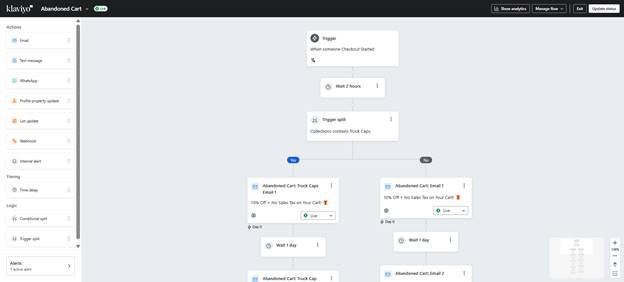
Source: Klaviyo
Well-known ecommerce platforms such as Shopify, WooCommerce, and BigCommerce make automation simple with built-in options or seamless connections to tools like Klaviyo, Omnisend, Mailchimp, and ActiveCampaign. These tools track when someone adds items to their cart and automatically trigger your email sequence when they leave.
Look for a solution that offers:
- Easy integration with your e-commerce platform
- Automation workflows
- Email templates you can customize
- Analytics and reporting
- Mobile-responsive email designs
Most tools offer templates for cart abandonment sequences, which give you a head start. Customize them to match your brand voice and visual identity.
Segmentation
Not every abandoned cart deserves the same treatment. A first-time visitor abandoning a $20 item is different from a loyal customer abandoning a $500 purchase.
Consider segmenting your sequences based on:
- Cart Value: High-value carts might warrant a more personalized approach or a phone call follow-up, while low-value carts get the standard sequence.
- Customer Type: First-time shoppers might need more trust-building elements, while returning customers might respond better to loyalty rewards or personalized recommendations.
- Abandonment History: Someone who frequently abandons carts might be a chronic browser. Maybe they need a different approach or should be excluded from discount offers to prevent conditioning them to wait for deals.
Personalization That Actually Matters
Generic emails get generic results. Personalization goes beyond just inserting the customer’s first name (though that’s a start).
Use dynamic content to show exactly what products they left behind. Include the specific product names in subject lines when it makes sense. Reference their browsing behavior if your system tracks it — “We noticed you were looking at running shoes” hits differently than a generic message.
If someone abandoned a cart after spending significant time on your sizing guide, the second email could address sizing concerns specifically. If they looked at reviews extensively, lead with social proof.
Refining and Improving Results
Set up your sequence, but don’t just let it run forever without checking performance. Test different elements to improve conversion rates over time.
Try different subject lines, send times, email copy variations, and offers. A/B test one element at a time so you know what actually made a difference. Maybe your audience responds better to humor, or perhaps they prefer straightforward messaging.
Track key e-commerce metrics such as open rates, click-through rates, and most importantly, recovery rate. Which email in your sequence performs best? Can you make the underperforming ones work better?
Pitfalls to Watch Out For
Some pitfalls can tank your cart abandonment sequence before it even gets a chance to work.
- Avoid flooding your customers’ inboxes. Three is usually the sweet spot. More than that, and you risk annoying people or ending up in spam folders.
- Avoid being too pushy or desperate. Nobody likes feeling pressured into buying something. The tone should be helpful, not aggressive.
- Don’t make the email all about you. Yes, mention your policies and features, but frame everything around the customer’s needs and concerns.
- Don’t forget mobile optimization. Most emails today get read on smartphones rather than computers. If your emails look broken or the buttons don’t work on phones, you’re losing conversions.
- Don’t ignore customers who do convert. Once someone completes their purchase from a cart abandonment email, remove them from the sequence immediately. Nothing feels weirder than getting reminder emails after you’ve already bought the item.
Legal Considerations
Make sure you’re following email marketing laws in your region. This means including an unsubscribe link in every email and honoring opt-out requests promptly.
For GDPR compliance in Europe, ensure you have proper consent to send marketing emails. Cart abandonment emails often fall into a gray area between transactional and marketing emails, but it’s better to be safe.
Measuring Success
Set up proper tracking from day one. Monitor your recovery rate, revenue generated from abandoned cart emails, and the ROI of your sequence.
Evaluate whether the income you’re bringing back from abandoned carts outweighs the cost of your email software and promotional offers. If you’re offering 10% off in your third email but recovering 15% of abandoned carts, that’s probably a good trade.
Track which products get abandoned most often. Sometimes the problem lies not with the customer but with factors like pricing, product descriptions, or images that could be improved.
Beyond the Basics
Once your fundamental sequence is running smoothly, consider advanced tactics. Add SMS messages to your sequence for high-value carts. Create retargeting ads that complement your email sequence. Use exit-intent popups to capture emails before people leave.
Consider adding a fourth email for very high-value carts, or create special sequences for specific product categories that have unique considerations.
Final Thoughts
Cart abandonment is inevitable, but it doesn’t have to mean lost sales. An automated email sequence can recover a significant portion of those abandoned carts, turning potential losses into actual revenue.
Start with a simple three-email sequence, focus on timing and messaging, and optimize based on results. Keep the tone friendly, remove friction wherever possible, and make it easy for customers to complete their purchase.